You have received your document with the e-Apostille and may need advice on how to access your PDF document.
Here we provide a complete guide on accessing and viewing your legalised document and the apostille.

Make sure you have Adobe Reader on your computer. You cannot view the e-apostille on a mobile phone.

view your pdf e-apostille

How to view your e-Apostille?

You will receive a PDF file with several documents included.

Cover Letter

FCDO letter explaining how to view your file

Your Document

Your document is included with the digital solicitor certification

The e-Apostille

Your e-Apostille is included within the PDF file

1-2 Days

e-Apostille processing time

98%

Paper apostilles issued

2%

e-Apostilles issued

Guide to Viewing the e-Apostille

You will Adobe Reader to view the apostille.
You cannot use other PDF apps or view on a mobile phone!
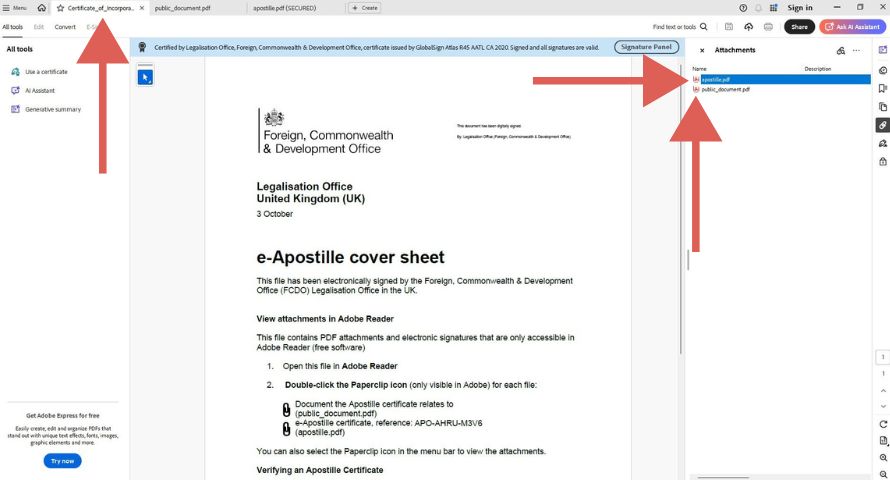
e-apostille cover sheet

Step 1 – Open PDF

Apostille Cover Letter

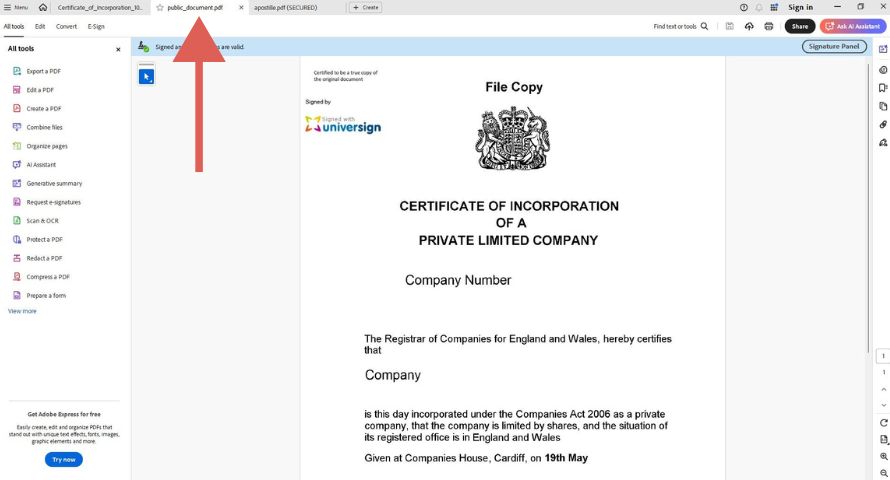
Your PDF file contains the FCDO Legalisation Office letter. When you have this document open, you need to click on the two additional files to view them. This will open two more tabs in the PDF file.

  • apostille
  • public-document
document in e-apostille file

Step 2 – View Document

Your Document

Your document is included within the Adobe PDF file. You can view the document with the digital solicitor certification.

  • The solicitors signature
  • How it was certified
  • Date of certification
document in e-apostille file
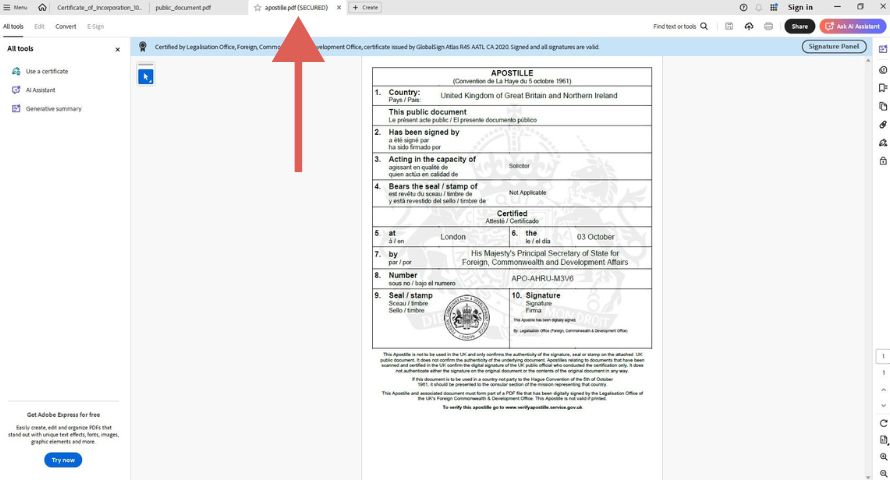
e-apostille certificate in e-apostille file

Step 3 – View e-Apostille

e-Apostille Certificate

When you click on the apostille tab, you can see the e-apostille certificate with the PDF file. This includes the apostille number (APO1234….), the name of the solicitor that signed the document and the date it was issued.

You need to open the PDF file with Adobe
Download Adobe Reader

All e-Apostilles are provided by the FCDO Legalisation Office. They prepare the PDF files with Adobe. You cannot view the e-Apostille with other PDF reads.

download e-apostille

What Documents
do we process?

We can add the apostille to documents that ‘need’ solicitor certification to be legalised. We cannot add e-apostilles to many government and public documents (e.g. criminal record checks, birth certificates, marriage certificates etc.).

Academic Documents

Degrees, masters, PGCEs, PhDs, professional qualifications and more…

Legalise your academic documents

Personal Documents

Driving licence, passports, employment documents, tax documents and more…

Legalise your personal document

Business Documents

Certificates, Companies House forms, mem and arts and more.

Legalise your company documents

Speak To Our Experts. Call +442476100001 02476100001 or Request A Quote

Used their services. They are very fast, and the team is super responsive. Highly recommend to anyone looking for apostille services.

Divin Ngabire – Google Review

4.8

Trusted by Thousands of Customers

Contact Us

Fast e-Apostilles
Registered Service

We aim to complete all apostilles orders in just 1-2 days.

Paper apostilles and e-apostilles for UK documents.

e-Apostille in 2 Days
Paper Apostilles in 2 Days
Embassy Attestation in 10 Days

Frequently Asked Questions

Frequently Asked Questions

Yes. An e-Apostille has the same legal value as the traditional paper apostille in all countries signed up to the Hague Apostille Convention. However, some authorities may still prefer or require paper apostilles, so it’s recommended to check with them before applying.

Most Hague Convention countries. Any country signed up to the Hague Apostille Convention should recognise and accept the e-Apostille. That said, some authorities still insist on the traditional paper apostille.

Sometimes. Printing the e-Apostille removes most of the security features so in most cases authorities overseas will insist on receiving the digital file. A printout of the e-Apostille could still be verified on the FCDO website but would not be linked to an actual document so it would be unusual for a printout to be accepted abroad.

Via the verification page on the FCDO site. A verification url is included within the e-Apostille certificate to enable foreign authorities to verify this. The digital file will also contain electronic signatures which can be validated within the adobe reader software.

No functional difference. Both certify that a document is genuine and both are issued by the FCDO. The only difference is format: an e-apostille is a digital PDF, while a paper apostille is a physical certificate attached to your document. E-apostilles are generally faster to obtain and easier to send abroad. Some authorities overseas will still prefer a paper apostille.

No. E-apostilles do not expire. However, the underlying document may have validity requirements depending on the receiving country or authority. For example, some countries require certain documents to be less than three months old.

The paper apostille may be needed. If the receiving country or authority does not accept e-apostilles, you will need to obtain a traditional paper apostille instead. We can assist with that too.

Related Guides